GBG METAVERSE — HOW TO CONNECT
Connect your OpenSim viewer to GBG METAVERSE.
Grid Information
To join GBG METAVERSE, use any OpenSim-compatible viewer.
🔗 OpenSimulator Connection Guide
LoginURI
http://hg.gbg-world.com:80/
Viewer Downloads
Firestorm Instructions
Step 1
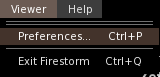
Click Me → Preferences.
Step 2
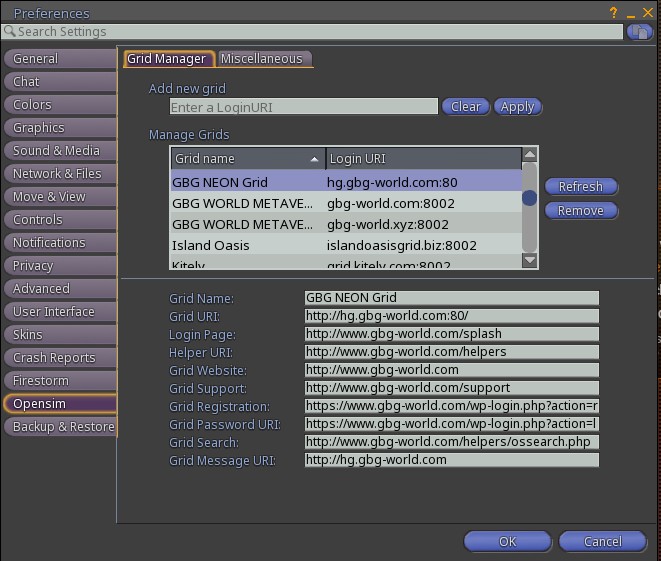
Open Opensim and enter:
http://hg.gbg-world.com:80/
Step 3

Select GBG METAVERSE and click Login.
Singularity Instructions
Step 1

Open Grid Manager.
Step 2
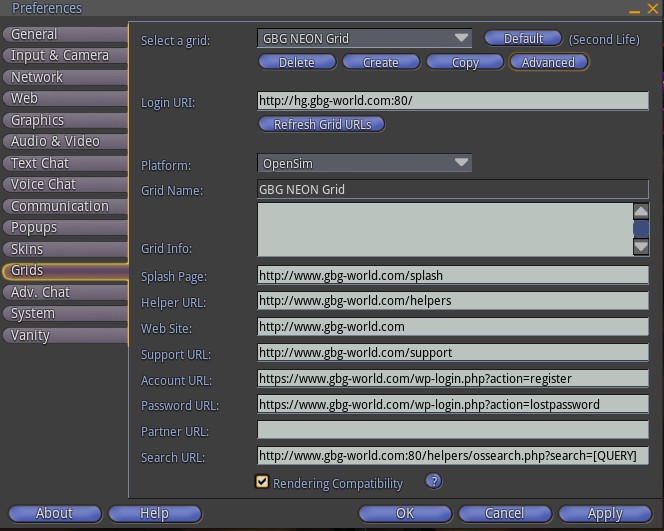
Click Create and enter:
http://hg.gbg-world.com:80/
Step 3
Select GBG METAVERSE and click Login.
AUTOMATIC VIEWER CONFIGURATION
CLICK APPLY NOW